 DeskDraft
How to make a classroom seating chart
A useful seating chart reflects the physical room and the people in it. The goal is not a perfect arrangement; it is a clear first draft that makes practical constraints visible and remains easy to adjust.
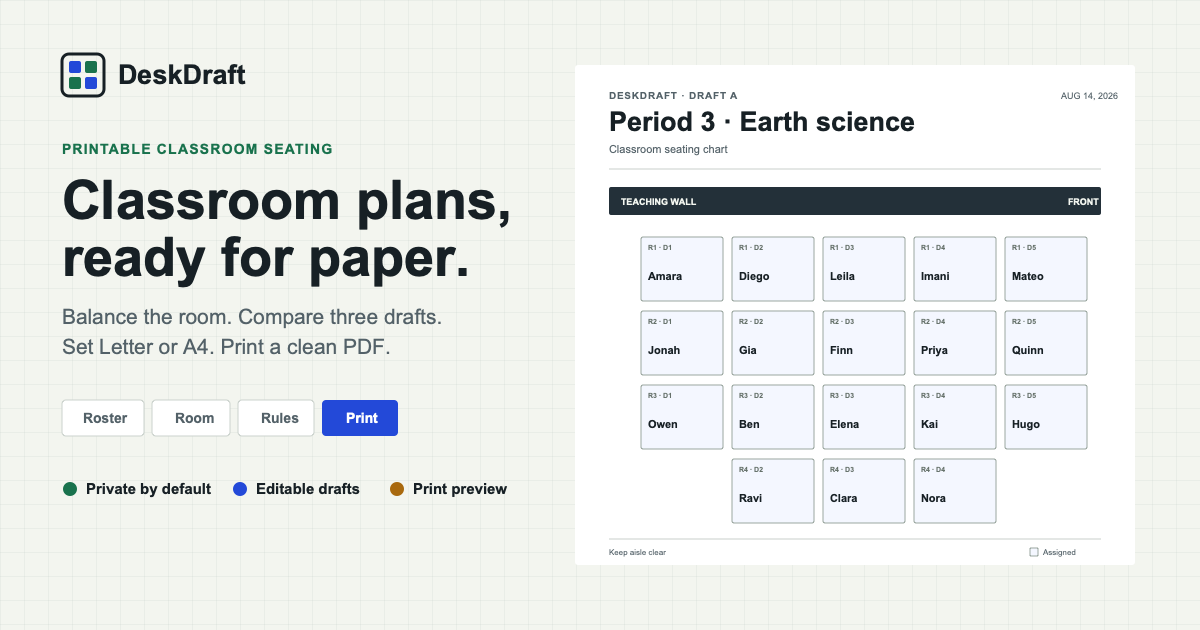
Start with the actual room
Count usable desks and sketch their normal rows and columns. Preserve aisles, doors, teaching equipment, wheelchair access, and circulation space by deactivating desks rather than pretending the room is a perfect rectangle.
Identify the teaching wall. A “front row” rule only makes sense when the planner knows which edge of the room is front.
Record needs, not labels
Use a small set of concrete placement rules. DeskDraft supports three that are understandable and auditable:
- Front row for a student who needs proximity to instruction.
- Keep together when a peer arrangement is intentionally supportive.
- Keep apart when additional space reduces distraction or conflict.
Keep sensitive explanations outside the chart. A placement rule is enough for generation and avoids putting private context into a printable artifact.
Compare alternatives
One generated result can look inevitable even when many arrangements satisfy the same rules. Compare multiple drafts to see how the room changes when the same needs are balanced differently.
DeskDraft produces three alternatives. Select two desks to swap their occupants, or drag one student to another desk. Pin placements you want to preserve before regenerating.
Check the plan in context
Before using a chart, scan each row for sight lines, movement, empty desks, and clusters that may be difficult to supervise. A mathematically valid arrangement can still need a teacher’s judgment.
After the first lesson, update the chart based on observed behavior. A seating plan is a working document, not a permanent verdict.
Seating chart FAQ
How many students can DeskDraft place?
The room can contain up to eight rows and eight columns. The active desk count must be at least as large as the roster.
Can I make an irregular desk layout?
Yes. Create the enclosing row-and-column grid, then deactivate individual desks to represent aisles and missing positions.
Will every rule always be satisfied?
No. Constraints can conflict or exceed the available positions. DeskDraft reports unresolved rules instead of silently claiming a perfect fit.
Can I print the final chart?
Yes. The printable seating chart guide explains paper size, orientation, scale, and PDF settings.
Build the first draft in your browser.
Import the roster, model the room, compare three plans, and keep student information on your device.
Open DeskDraft